Getting started#
Welcome to your Librem 16! This document will help you get started with your Librem 16.
Power on the laptop#
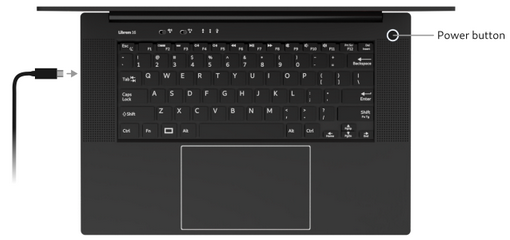
Attach the power adapter to mains power and to one of the USB-C ports of the Librem 16 to charge the battery. Press the power button to start the laptop.
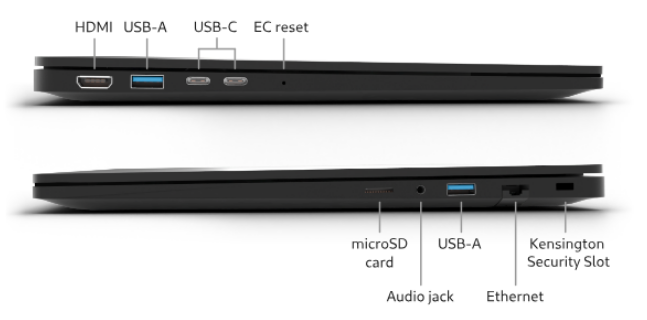
Start using PureOS#
Follow the instructions on the screen to personalize your installation of PureOS. No personal information is required during the setup of PureOS.
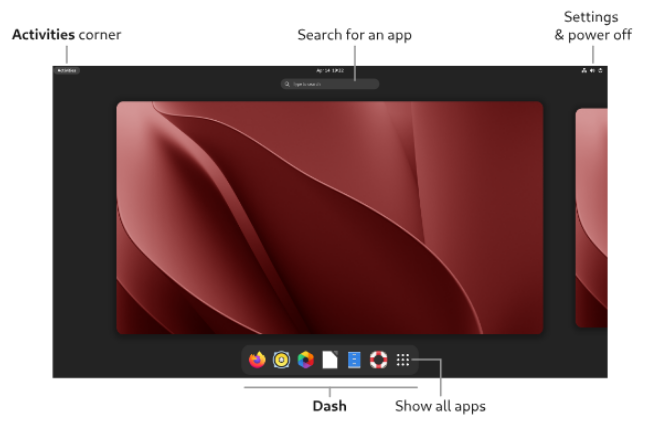
Once the setup is completed, you can use the Dash to open an application. Use the Activities hot corner to bring back the Activities overview with the Dash.
Hardware kill switches#
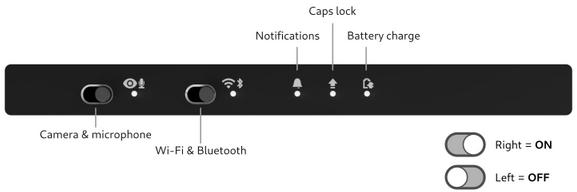
With the hardware kill switches, you can make sure that your privacy is protected. When a kill switch is OFF, the corresponding components are physically disconnected and cannot operate. Switch it back ON to use it again.