Privacy#
Kill switches#
Hardware kill switches physically disconnect power to certain hardware components of the device.
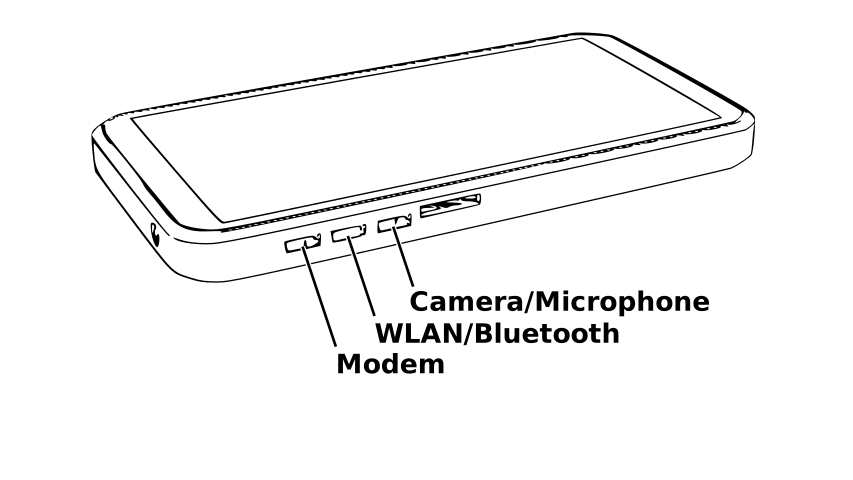
Kill switch locations on the edge of the phone#
Kill switch |
Affected circuit |
|---|---|
Cellular modem |
Power to the M.2 modem |
WLAN/Bluetooth |
Power to the M.2 Wi-Fi/Bluetooth module |
Camera/microphone |
Power to the camera and microphone |
Note
Features may be disabled at the software level when a kill switch is in the enabled position. Conversely, it may not be possible to remove power to hardware functionality in software.
Terminology#
Due to the lexical ambiguity of kill switch engagement, it is important that users use consistent terminology to describe whether or not power is being applied to hardware affected by a hardware kill switch. This section aims to converge on a common meaning.
Kill switch mode |
Meaning |
|---|---|
Active |
The kill switch is in a position that allows power to flow to the peripheral. |
Inactive |
The kill switch is in a position that prevents power from flowing to the peripheral. |
As it relates to the Librem 5 and Liberty phones:
Enabled: A kill switch is enabled when it is in the UP position, closest to the top edge of the phone, away from the SIM tray.
Disabled: A kill switch is disabled when it is in the DOWN position, closest to the bottom edge of the phone.
Lockdown mode#
When all three switches are in the disabled position, these additional features are disabled:
Global Navigation Satellite System (GNSS) unit – GPS and other networks
Inertial Measurement Unit (IMU) – accelerometer, gyroscope, magnetometer
Ambient light and proximity sensors
These features will be enabled if any of the switches are in the enabled position.