Replace rear cover#
Purism makes products that put you, the customer, in control. Generally, Librem devices are easy to disassemble for access to their internals. For the Librem 11, our focus in the first iteration is on the interior components rather than the chassis itself, which means it has an adhesive back.
If you or a friend have a 3D printer, it is possible to replace that single adhesive component with a modular rear cover secured with screws. With this change, you can disassemble the Librem 11 easily, and it still remains about 8 mm thick.
See also
Required materials#
Quantity |
Component |
|---|---|
1 |
Librem 11 |
1 |
3D printer, with print volume approximately 270x170x1.5 mm |
1 |
Small Philips-head screwdriver |
1 |
Sharp hobby knife |
16 |
M1.4 screws, 4mm long |
1 |
Roll of foil tape, commonly used for sealing ductwork |
1 |
Plastic spudger pry tool |
1 |
Procedure#
Warning
Read all instructions before attempting anything with your device! This process will irreparably damage the grey Librem 11 backing plate. Do not proceed with this procedure unless you intend to follow it to completion.
Remove rear cover#
Remove the adhesive back from the Librem 11.
Using a spudger, gently pry off the “OLED Inside” label. It is separate from the gray back, so begin from the outside edge and it should remove easily.
Peel off the gray backing panel. There is no going back once you remove this! This will deform the aluminum, and it will not easily smoothen out again.
Use the spudger to lift the edge around the “OLED Inside” label. There are no exposed sensitive components along the edge, so do not worry about poking the spudger underneath the panel by a few millimeters. Just be gentle.
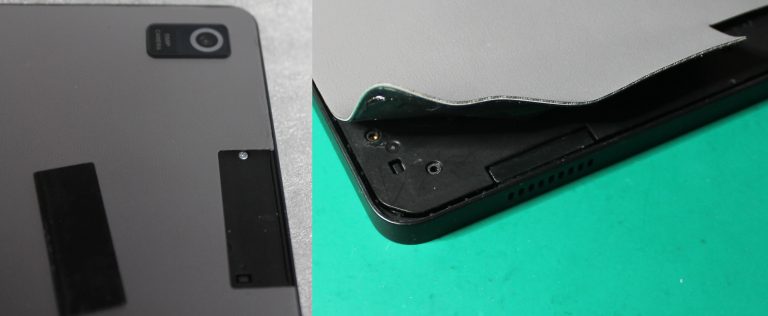
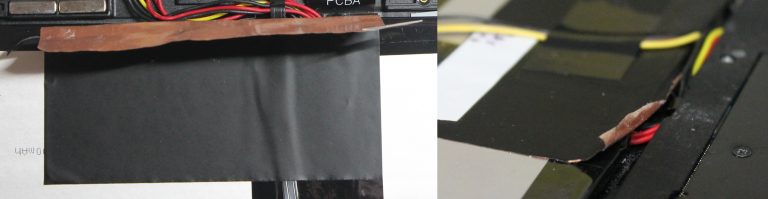
Gently peel the panel the rest of the way with your hands. It should not require excessive force. Do not use the spudger here to avoid damaging the battery or the dock connector ribbon cable. Be mindful of the dock connector ribbon cable while peeling; it crosses the center of the battery. The copper foil should prevent it from peeling up with the back.
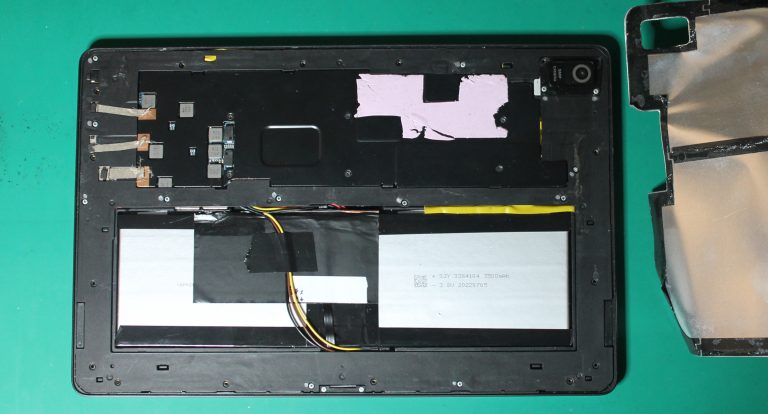
You can now see the heat spreader, battery, and dock connector ribbon cable. (It will look a little different from the one in the photo. The copper foil has already been cut in the photo, and a UART has already been added for firmware hacking. More information on those to come later.)
Print test piece#
The model must very precisely match the tablet, so print the test piece first to check. I calibrated it with my 3D printer, but yours might vary slightly.
Load
l11_back_test.stlwithin your slicer of choice, and apply some settings:Parameter
Value
Layer height
<= 0.2mm
Perimeters
1 (important so screw holes are bonded well)
Infill
100%, rectilinear, 45 degree fill angle (important so perimeters are well bonded)
Optionally, use
l11_back_fill_90_modifier.stlas a modifier for the top layer if you want a different fill angle for aesthetics. I like it with 90 degrees on the top layer. If you do a Hilbert curve, please share pictures!Print the test piece:
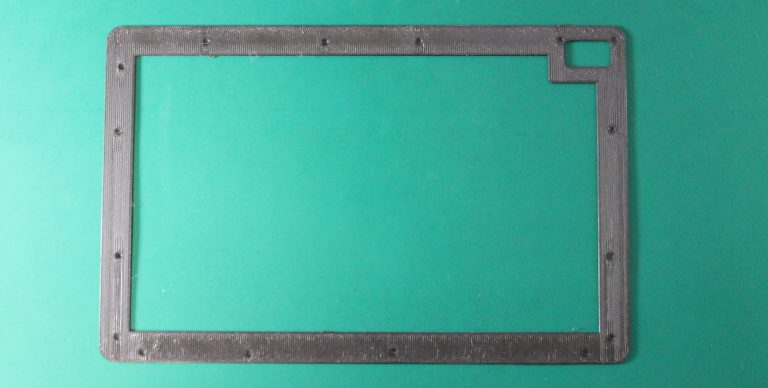
Place the test piece onto your Librem 11 and snap the camera corner around the camera lens. If it does not fit well, check for burrs or elephant-foot enlargement on the bottom layers, trim them with a hobby knife.
With that corner down, the other edges should naturally rest inside the lip edge of the Librem 11. If they sit on top, the keyboard cover will not dock. If you have to press them in slightly, it may cause a slight bulge on the real part.
Verify that the screw holes are all aligned.
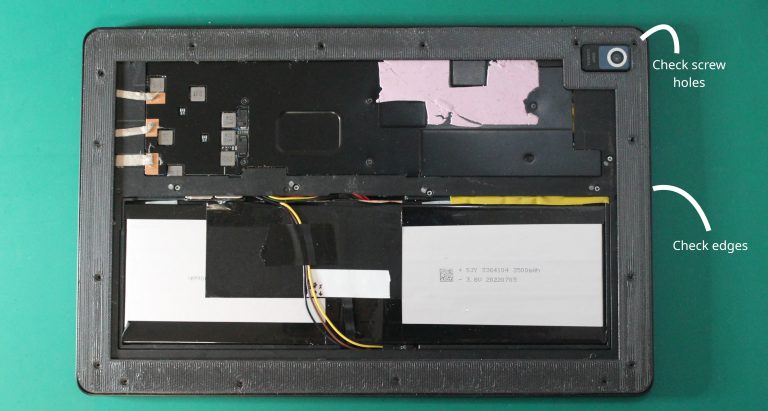
Remove the factory screws that align with the screw holes on the test piece. These will be replaced with 4mm screws. Several of the factory screws will remain to hold the midframe; these are marked with a silver marker.
Secure the test piece with 4mm M1.4 screws. Hand-tighten, but do not overtighten. The screws should go in easily without flexing the test piece.
If the test piece did not fit any of the above, adjust the scale and try again. It probably will not need more than 1% adjustment at most. Even 0.2% can make a big difference for this part. (I scaled my original measurements by 100.55% for a precise fit, which is included in the model.)
Print and shield#
Once satisfied with the scale of the test piece, print
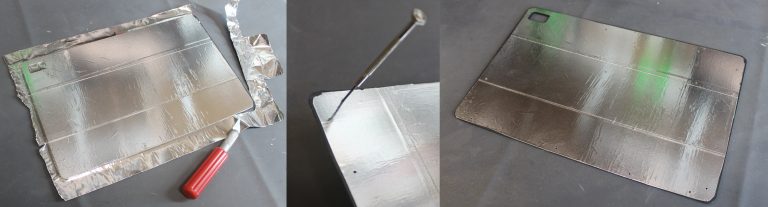
l11_back.stlusing the same settings.Apply foil tape to the inside. A small amount of overlap between pieces of tape is acceptable.
Trim the tape with a hobby knife just inside the edge and around the camera hole.
Poke out the screw holes using a screwdriver. Ensure the foil bits do not end up on the tablet.
Secure the finished back with 4mm M1.4 screws.
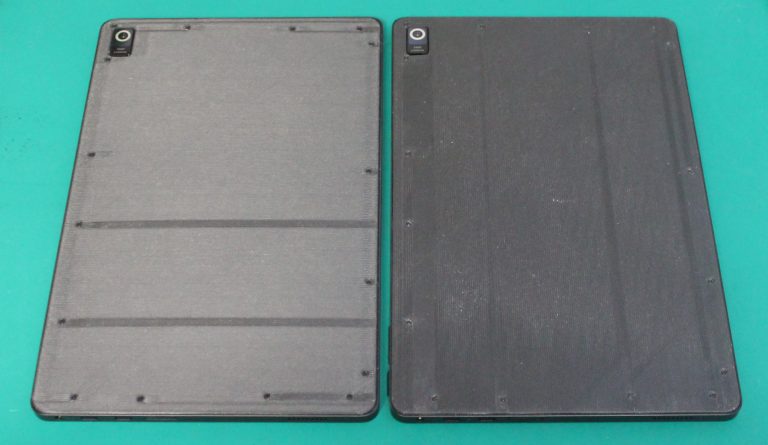
A look inside#
Following this procedure, you can disassemble and reassemble whenever you want!
The copper foil attaches the midframe to the battery and heat spreader. Be mindful of the thin ribbon cable running under it to the dock connector. You can peel the top back from the heat spreader and midframe, then cut it there. Be particularly mindful of the battery wiring and dock ribbon while cutting! You can also peel it off entirely, separating it carefully from the dock ribbon, but I ended up taping the dock ribbon down again anyway.
Remove the remaining 3mm silver screws to release the midframe and camera cover.
Remove 8 screws from the heat spreader to access the NVMe SSD and mainboard. They are not all the same:
3x 3mm silver screws around the edge (a fourth holds only the mainboard)
1x small black screw near the SSD, possibly under the thermal pad
4x larger black screws around the SoC (CPU)
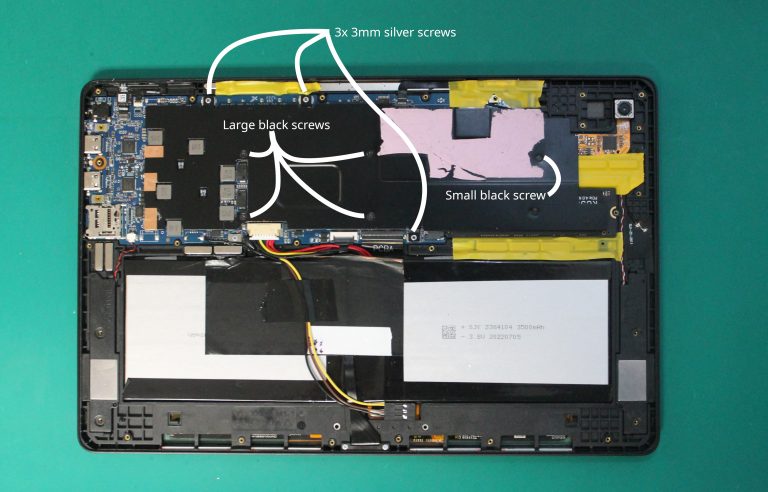
The SSD is socketed and supports PCIe 1x. SATA SSDs require a firmware modification.
I have taped the magnets down on mine; I open it a lot and they sometimes pop out. You can place them on the corresponding spot on the keyboard cover to find the correct orientation.
If you are a firmware developer, you can externally flash the SPI BIOS flash using a standard SOIC-8 chip clip and programmer. Accessing a UART is also possible with soldering. A UART is incredibly helpful for troubleshooting unbootable development builds. Additionally, you can store a 3-pin connector just below the battery, allowing the back cover to still be installed.
Purism devices are built for your control. Personalize your Librem 11 and show it off!