Extending battery life#
Here are some tips for saving battery life:
Reduce brightness! The display is the biggest consumer of power.
Close tabs! Close excessive tabs in your browser if you do not need them. More opened tabs means more load on the CPU, which translates to more power consumption.
Avoid browsers altogether You can watch YouTube videos directly in
mpvorsmplayer, thus avoiding using web browser for this.youtube-dlcan also download (or forward direct link to other programs) videos from a wide range of online video websites.Turn off WiFi Turn of WiFi if you do not require an Internet connection. This will save some power.
Enable hardware video acceleration
Enable automatic suspend#
Having automatic suspend enabled can greatly improve your computer’s battery runtime when it is idle.
Automatic suspend is enabled by default on desktop PureOS, however, on mobile, this is not enabled by default.
To adjust the automatic suspend settings:
Open the Settings application.
Navigate to the Power menu item.
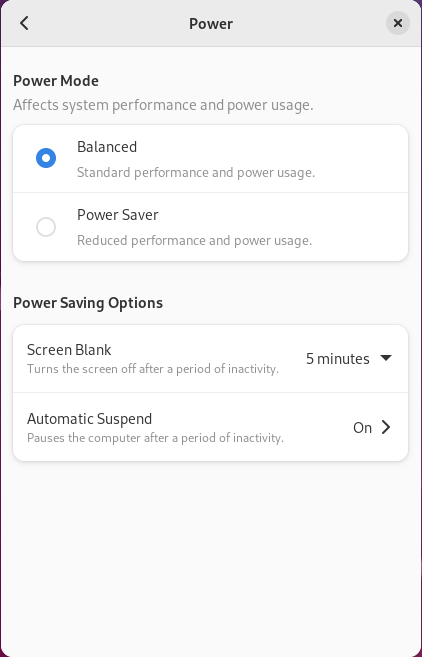
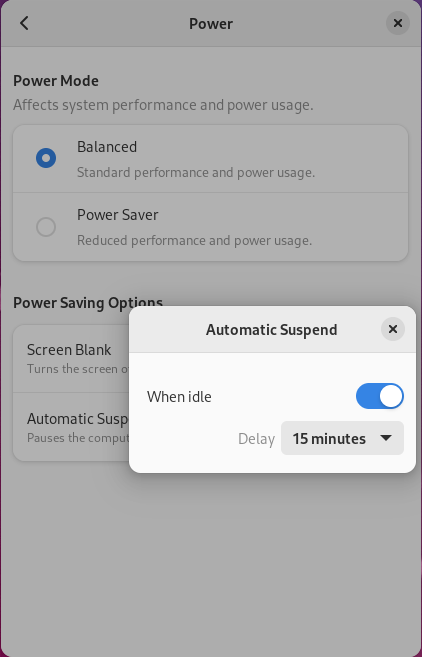
Select the Automatic Suspend option. A popup will appear. If enabling automatic suspend, we recommend setting 15 minutes for desktop PureOS and 2 minutes for mobile PureOS.